Designing Digital Learning with Purpose
Thinking about SharePoint through the lens of teaching and learning

SharePoint, Directed Learning, and the Purposeful Use of Technology
This post is the first in a short series exploring how I have used SharePoint to support subject leadership and student learning. While my examples are drawn from geography, the ideas are relevant to anyone thinking seriously about how online platforms can support learning design, rather than simply acting as places to store resources.
I am not an IT hardware or software specialist, nor a SharePoint expert—and I still have much to learn. My perspective is instead rooted firmly in teaching, curriculum, and subject leadership. Alongside nearly 25 years in the classroom, I have worked in a range of roles including Advanced Skills Teacher and Lead Practitioner, later as a Head of Department, and now as National Lead for Geography within a multi-academy trust. Across these roles, my interest has consistently been in how digital tools can meaningfully support teaching and learning, rather than distract from it.
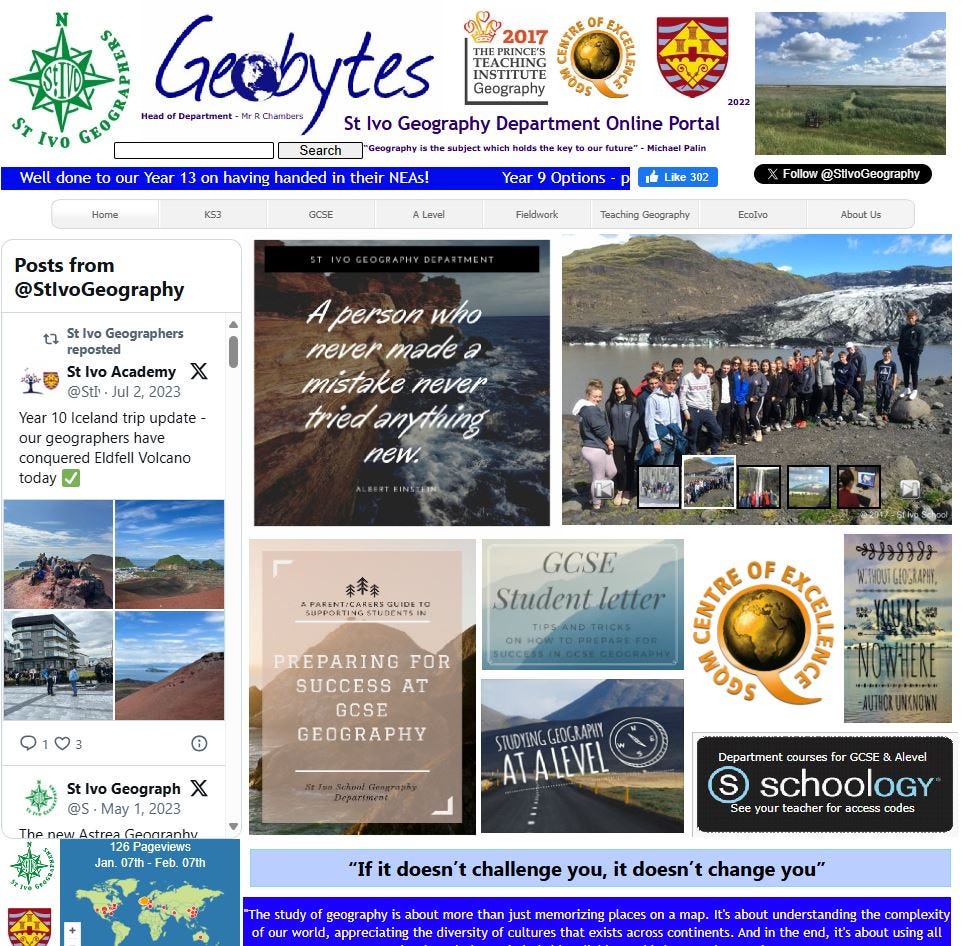
In 2015, I was fortunate to receive a Teach Secondary Technology and Innovation Award linked to my use of digital tools to support teaching and learning. By that point, my interest in online learning was already well established and I ran an educational technology blog - ICT Across the Curriculum. For many years, alongside my classroom teaching, I also ran and maintained my own department website “Geobytes” (unfortunately no longer live! but immortalised in the image below!) using it as a space to explore how online environments could support students beyond the classroom. This included experimenting with blogs, curated reading, and structured pathways through content, as well as providing access to resources in ways that were more intentional than simply uploading files.
Alongside this, I extensively explored the functions of VLE platforms such as Digital Brain (an early UK virtual learning environment supporting structured online learning and digital literacy) and later Schoology, using their course-based functions to design and deliver online learning experiences. These platforms offered opportunities to structure content, sequence learning, and support independent study, and they played an important role in shaping my understanding of how online spaces can either support or hinder learning depending on how they are designed.
This work always sat alongside day-to-day classroom practice and subject leadership, rather than replacing it. Across these different roles, platforms, and contexts, a consistent question has shaped my thinking: how can online environments be designed to save time, reduce cognitive load, and direct attention towards the learning that matters most?
An important guiding principle in my approach to educational technology has always remained clear: its value lies in impact, not novelty. Technology should serve learning, not seek to impress through innovation alone. What matters is whether a tool provides genuine, sustained benefit—and that will always depend on context, learners, and purpose.
Beyond Resource Sharing: Signposting and Retrieval
Alongside platforms designed to organise and present curriculum content, I also have a real interest in digital tools that support learning in different ways—particularly those that strengthen understanding and retention rather than simply deliver information. One example is Carousel Learning, which I have found especially powerful for retrieval practice and revision through low-stakes questioning, immediate feedback, and repeated engagement with key knowledge. Used well, tools like this allow students to check understanding, revisit prior learning, and identify gaps without the pressure associated with formal assessment.
Rather than expecting students to independently hunt for useful resources—whether videos, articles, or revision tools—I have found that deliberate signposting through online platforms is far more effective. When digital spaces are designed to guide students clearly to the right resources at the right time, access to learning becomes more efficient and purposeful, reducing wasted time and uncertainty.
This aligns closely with a core principle of curriculum design: supporting schema building by making connections explicit and sequencing knowledge deliberately. Online platforms offer a powerful way to extend this clarity beyond the classroom. Through carefully designed pages, pathways, and links, students can be guided through structured routes that support learning, rather than being left to navigate the vastness of the web or multiple disconnected platforms.
In practice, this means directing students to specific tools at purposeful points in their learning—for example, signposting retrieval and revision platforms alongside the curriculum content they are studying. Tools such as Carousel Learning complement structured curriculum spaces like SharePoint. One provides clarity, sequence, and access to curriculum knowledge; the other supports consolidation, retrieval, and long-term retention. It is the intentional connection between these platforms that makes the difference—often achieved through something very simple: clear, well-placed hyperlinks within SharePoint pages that direct students to the most relevant and useful resources. This explicit ordering helps students access what will give them the greatest benefit, without wasting time searching or second-guessing where to go next.
From Individual Classes to Subject Communities
The pandemic marked a significant shift in how digital platforms were used to support teaching and learning beyond the classroom. Staff—regardless of prior confidence or experience—were required to adopt online tools as a matter of necessity. Like many others, I saw the benefits of Microsoft Teams, particularly through Class Teams, as a platform that could extend learning beyond the classroom. While not a learning management system, Teams proved effective for communication, resource sharing, and ongoing academic support.
What began as an emergency response during periods of online home learning became a genuinely useful tool that I continued to use with both GCSE and A-level classes once students returned to school. Through Class Teams, I was able to share lesson materials, revision resources, and wider reading, as well as respond to student questions via the forum-style “General” channel. Used well, this provided a meaningful extension of classroom learning rather than a temporary stopgap.
However, as my role shifted from leading a single department to supporting a subject community across multiple academies, the limitations of Teams as a student-facing curriculum platform became more apparent. While Teams remains highly effective within individual departments and classes, it is not designed—nor appropriate—for providing shared student-facing curriculum access at scale. For reasons of structure, safeguarding, and coherence, Teams is far better suited to contained cohorts than to cross-academy provision.
This is where SharePoint becomes particularly valuable. SharePoint sits behind Teams as the underlying platform for file storage and permissions, but it also offers capabilities that extend well beyond what Teams alone can provide. Crucially, SharePoint allows content to be organised and surfaced independently of individual class teams, making it possible to create structured, curriculum-aligned spaces that can be safely accessed by students across different academies.
This also required a shift in how different digital spaces were used. While Teams remains the most effective environment for collaboration, discussion, and co-authoring within departments and subject communities, it is less well suited to providing stable, student-facing curriculum spaces at scale. SharePoint, particularly through communication-focused pages, allows resources to be curated and presented deliberately for reference rather than collaboration. This distinction—between spaces designed for interaction and those designed for structured access—has been central to moving away from Teams as a solution for whole-trust student resources.
Rather than relying on the more ‘conversational structure’ of Teams, SharePoint enables the deliberate design of pages, pathways, and links that guide users through material in a coherent and purposeful way.
Clarity and Cognitive Load in Resource-Rich Environments
One of the persistent challenges of online learning spaces is not the absence of resources, but their abundance.
Students rarely struggle because content does not exist; they struggle because finding the right content at the right time can require much cognitive effort. When learners are forced to hunt through complex folder structures or second-guess which document matters most, valuable learning time is lost and attention is fragmented before learning has even begun. In these situations, technology becomes a hindrance rather than a benefit. Reducing cognitive load through thoughtful digital design is not an end in itself; it is a means to something more important. When students can access resources quickly and confidently, their attention is freed to focus on understanding, connecting, and retaining knowledge. Carefully sequenced pathways through content support schema formation by helping students see how ideas relate, rather than encountering knowledge as isolated fragments.
The same is true for staff. When teachers are required to navigate sprawling digital spaces organised according to logic they did not design, cognitive load increases and time is taken away from curriculum thinking, lesson design, and responding to students’ needs. Used poorly, technology creates friction rather than efficiency. My interest is in technology where it reduces these burdens so attention can be focused on teaching and learning. When resources are organised around curriculum intent and purpose—for example, to support staff in particular areas, such as retrieval practice, raising attainment, revision etc. rather than around storage logic, teachers are better able to plan, adapt, and respond with clarity. Time saved navigating systems can be invested in intellectual preparation and thoughtful decisions about how best to teach the students in front of them.
From File Storage to Learning Architecture
SharePoint is often used as a document repository, with folders nested within folders and organised according to the logic of the individual who created them. While this may make sense to the original author, it is not always intuitive for others—whether students or staff—who may struggle to know where to look.
What I have found far more powerful is the use of SharePoint pages as learning spaces. Without any need to write code or build websites, SharePoint pages allow content to be presented in a clear, web-page-style format, with hyperlinks, documents, videos, and images embedded intentionally. This makes it possible to control what users see first, what comes next, and how different elements of the curriculum connect.
In effect, this shifts SharePoint from being a filing cabinet to becoming a form of learning architecture—one that prioritises clarity, sequencing, and purpose.
Looking Ahead
It was this thinking—around cognitive load, curriculum intent, and purposeful digital design—that led me to develop what I now refer to as Scholar Hubs within our Geography Subject Community.
In the next series of posts, I will move from principle to practice by focusing on how I am starting to develop Scholar Hubs using Sharepoint, as a form of trust-wide support for students across our academies. I will also explore how SharePoint, through its integration with Teams, supports subject communities and how individual departments can adapt these approaches to meet the needs of their own students and examination cohorts.
Other posts in this series:
The next two posts are…
2. Scholar Revision Hubs: From Principle to Practice
3. Scholar Hubs in Practice: Trust-Wide Learning - A Geography Example.